Advanced App Router Routing Patterns (Next.js)
Sep 17, 2025
Next.js introduced the App Router to give developers more power and flexibility when building modern apps. Beyond the basics, there are several advanced routing patterns that can help you create scalable, maintainable, and user-friendly applications. Let’s explore some of the most useful ones.
1. Parallel Routes for Composable Layouts
Parallel routes let you render multiple route trees inside the same layout.
For example, you may want a navigation bar to stay fixed on the left while the content changes on the right. Instead of re-rendering the whole page, you can split them into slots:
app/
  layout.tsx
  @nav/
    page.tsx
  @content/
    page.tsx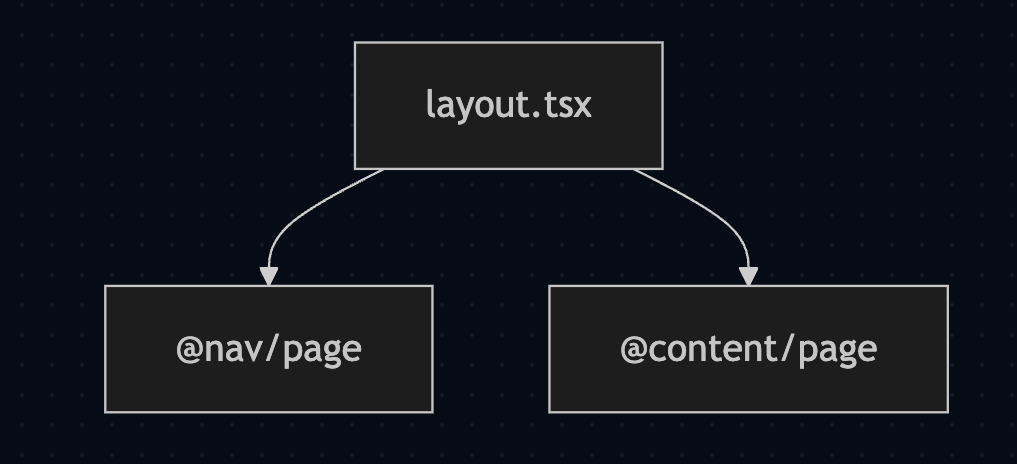
Layout mounts the slots by name:
// app/layout.tsx
export default function RootLayout({
  children,
  nav,
  content,
}: {
  children: React.ReactNode;
  nav: React.ReactNode;
  content: React.ReactNode;
}) {
  return (
    <html lang="en">
      <body>
        <aside>{nav}</aside>
        <main>{content ?? children}</main>
      </body>
    </html>
  );
}
2. Intercepted Routes for Modals
Sometimes you want a detail view to appear as a modal on top of a list page — without losing the list state. Intercepted routes make this possible.
Folder Shape:
app/
  feed/
    page.tsx
    @modal/(..)post/[id]/page.tsx   ← intercept from feed
  post/
    [id]/page.tsx                   ← canonical page
In feed/page.tsx, render the @modal slot where the modal should appear:
// app/feed/page.tsx
export default function Feed({ modal }: { modal: React.ReactNode }) {
  return (
    <>
      <ul>{/* feed items */}</ul>
      {modal}
    </>
  );
}
When the detail page is accessed directly, it shows as a standalone page. But when accessed from the feed, it overlays as a modal. This creates a smoother user experience.
3. Route Groups for Layout Control
Group folders without affecting the URL. Useful for changing layouts per section or isolating error/loading boundaries.
app/
  (marketing)/
    layout.tsx
    page.tsx
  (app)/
    layout.tsx
    dashboard/page.tsx
URL stays /dashboard; the (app) layout wraps only the app area.
4. Optional Catch-All with Smart 404s
Using [[...slug]], you can handle dynamic nested routes. If a route doesn’t exist, you can call notFound() to display a proper 404 page instead of showing broken UI.
// app/docs/[[...slug]]/page.tsx
import { notFound } from 'next/navigation';

export default async function Docs({ params }: { params: { slug?: string[] }}) {
  const path = (params.slug ?? []).join('/');
  const doc = await fetchDoc(path); // your lookup
  if (!doc) return notFound();
  return <article dangerouslySetInnerHTML={{ __html: doc.html }} />;
}
You can also pre-render common routes with generateStaticParams while keeping the rest dynamic.
5. Loading and Error Boundaries per Segment
Each route segment can have its own loading.tsx and error.tsx. This means you can show loading states and handle errors closer to where they happen, instead of at the entire app level. It improves feedback for users and makes debugging easier.
// app/projects/[id]/error.tsx
'use client';
export default function Error({ error, reset }: { error: Error; reset: () => void }) {
  return (
    <div>
      <h2>Failed to load project</h2>
      <pre>{error.message}</pre>
      <button onClick={reset}>Retry</button>
    </div>
  );
}
6. Route Handlers with Custom Caching
Route handlers in app/api/.../route.ts allow you to define API endpoints.
// app/api/search/route.ts
export async function GET(req: Request) {
  const { searchParams } = new URL(req.url);
  const q = searchParams.get('q') ?? '';

  // Cache popular empty query for 60s, but user queries are dynamic.
  const isPopular = q === '';
  const data = await search(q);

  return new Response(JSON.stringify(data), {
    headers: {
      'content-type': 'application/json',
      'cache-control': isPopular ? 's-maxage=60, stale-while-revalidate=300' : 'no-store',
    },
  });
}
You can set caching rules directly with headers like s-maxage or use Next.js options like dynamic = 'force-static' | 'force-dynamic'.
This helps balance performance for frequently accessed vs dynamic data.
7. Partial Static Rendering with generateStaticParams
You don’t need to pre-build every possible page. Instead, pre-render the most popular routes and leave the rest dynamic.
With generateStaticParams, you define which paths to pre-build. Combine this with revalidate to refresh data at intervals.
// app/blog/[slug]/page.tsx
export async function generateStaticParams() {
  const hot = await getTopBlogSlugs(); // top 100
  return hot.map(slug => ({ slug }));
}

export const dynamicParams = true; // non-listed slugs are rendered on-demand
export const revalidate = 60;      // and revalidated periodically
8. Locale-Aware Routing Without URL Changes
Instead of changing the URL for different languages, you can detect the locale in middleware and serve the right content.
This keeps URLs clean while still providing a localized experience for users.
// middleware.ts
import { NextResponse } from 'next/server';
import type { NextRequest } from 'next/server';

export function middleware(req: NextRequest) {
  const url = req.nextUrl
  const locale = req.cookies.get('locale')?.value || req.headers.get('accept-language')?.split(',')[0] || 'en'
  const res = NextResponse.next()
  res.headers.set('x-locale', locale)
  return res
}// app/(locale)/layout.tsx
export default function LocaleLayout({ children }: { children: React.ReactNode }) {
// Read header via server only APIs if needed (e.g., headers())
return <html lang="en"><body>{children}</body></html>;
}9. Slot-Only Layouts
Some layouts don’t need the default children prop. Instead, they rely entirely on slots like @nav and @content. This approach is useful for shell UIs that are made up of multiple persistent sections.
// app/layout.tsx
export default function RootLayout({ nav, content }: { nav: React.ReactNode; content: React.ReactNode }) {
  return (
    <html lang="en">
      <body>
        <aside>{nav}</aside>
        <main>{content}</main>
      </body>
    </html>
  );
}
10. Robust notFound and redirect
Always handle missing data or redirects on the server side. Using notFound() and redirect() prevents client-side flickers and ensures the user always lands on the correct page.
// app/orgs/[id]/page.tsx
import { redirect, notFound } from 'next/navigation';

export default async function OrgPage({ params }: { params: { id: string }}) {
  const org = await getOrg(params.id)
  if (!org) return notFound()
  if (!org.active) redirect(`/orgs/${params.id}/billing`)
  return <h1>{org.name}</h1>
}
Conclusion
The App Router in Next.js isn’t just about basic pages — it provides advanced routing patterns that let you build apps that are flexible, scalable, and user-friendly. By using parallel routes, intercepted modals, route groups, caching, and smart error handling, you can design applications that feel seamless and professional.